


All posts by Mojoomla Themes
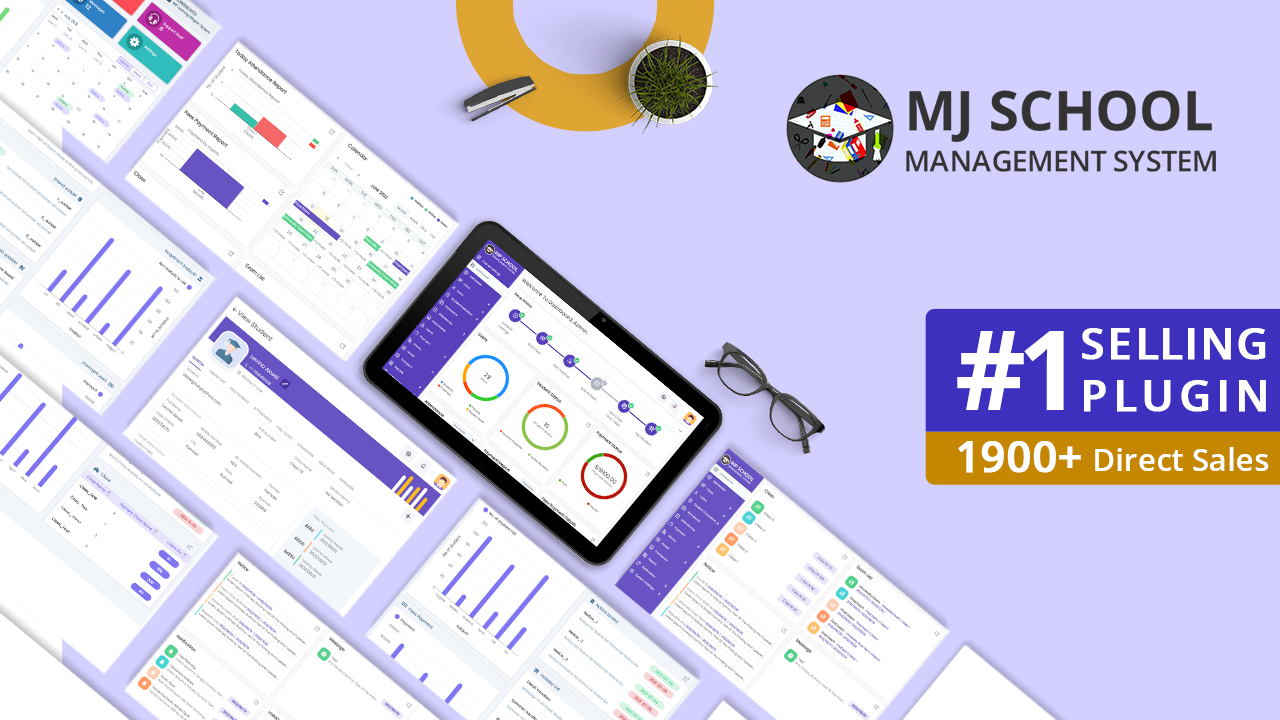
Modern School Management Software for Dutch Schools
If you are looking for a School Management System in the Netherlands, Mojoomla offers MJ-School, a complete platform designed to help Dutch schools manage students, classes, teachers, parents, and administration from one centralized system. Education in the Netherlands is becoming increasingly digital.

Why Schools in the Netherlands Need a School Management System

Schools across the Netherlands are adopting Digital School Management platforms to reduce manual work and improve communication
-
 Excel spreadsheets for student records
-
Paper forms for enrolment and administration
-
Email chains for communication with parents
-
Manual attendance tracking
-
Separate tools for scheduling and payments

As schools grow, these tools become inefficient and difficult to manage
A school management system helps centralize all school operations, improving efficiency for administrators, teachers, and parents.
Still Using Excel or Manual Tools to Manage Your School?
Many schools in the Netherlands still rely on spreadsheets, paper forms, and email chains to manage daily operations — until things stop scaling.
Excel Files
Emails
Paper Forms
Admin Chaos


Common Challenges Dutch Schools Face
Schools and academies across cities like Amsterdam, Rotterdam, Utrecht, and The Hague often experience similar operational challenges.
-
Disorganised student enrolment processes
-
Manual class scheduling and attendance tracking
-
Communication spread across multiple platforms
-
Difficulty managing online or hybrid classes
-
No centralized parent communication system

These challenges create unnecessary administrative workload and reduce operational efficiency.
Key Features That Support Dutch Educators
MJ-School by Mojoomla provides a complete school management solution designed for educational institutions in the Netherlands.

Online Student Registration & Course Enrolment
Parents register students online
Select levels and submit details online

Timetable & Attendance Management
Create weekly or Rotating Schedules
Track Attendance in Real Time

Exams, Assessments & Report Cards
Set up exams and record grades
Download digital or print reports

Flexible Course & Class Structure
Organise courses by subject or level
Support online and hybrid classes

WhatsApp Communication
Send reminders and schedule updates
Share urgent messages with parents

Online Class Integration
Run virtual group classes
Support one-to-one online sessions

Parent & Student Portals (Multi-Child Ready)
One login for families
See attendance, grades, and fees

Homework, Learning Resources & Quizzes
Upload homework and study materials
Share quizzes and tests online

Adaptable for Different School Structures
For Montessori and tutoring centres
Fits weekend and special academies
Designed for Different Types of Schools
MJ-School is suitable for a wide range of educational organisations in the Netherlands, including:
The platform is flexible enough to support both small academies and large multi-location institutions.
GDPR-Compliant School Management System
For schools in the Netherlands, data privacy and security are essential.
MJ-School is designed with GDPR-compliant architecture, ensuring that schools maintain full control over student and parent data.
-
Self-hosted deployment options
-
Secure user access control
-
Full data ownership
-
EU-compatible hosting
-
Secure data storage and management

his ensures that schools meet European data protection standardswhile managing education digitally.
Schools Across the Netherlands Can Use MJ-School
MJ-School can be implemented by schools and education providers across major Dutch cities such as:
Get Started with MJ-School
MJ-School by Mojoomla is suitable for schools in the Netherlands that want a GDPR-compliant, EU-hosted school management system without chaos or admin overload.
Support the next generation of education in the Netherlands.
February

How to Download Mojoomla Products After Purchase?
Buying and downloading products from Mojoomla is simple. Follow These easy Steps to Download your ZIP file.
Here is a complete Guide to help you.
Method 1: Download from Your Mojoomla Account
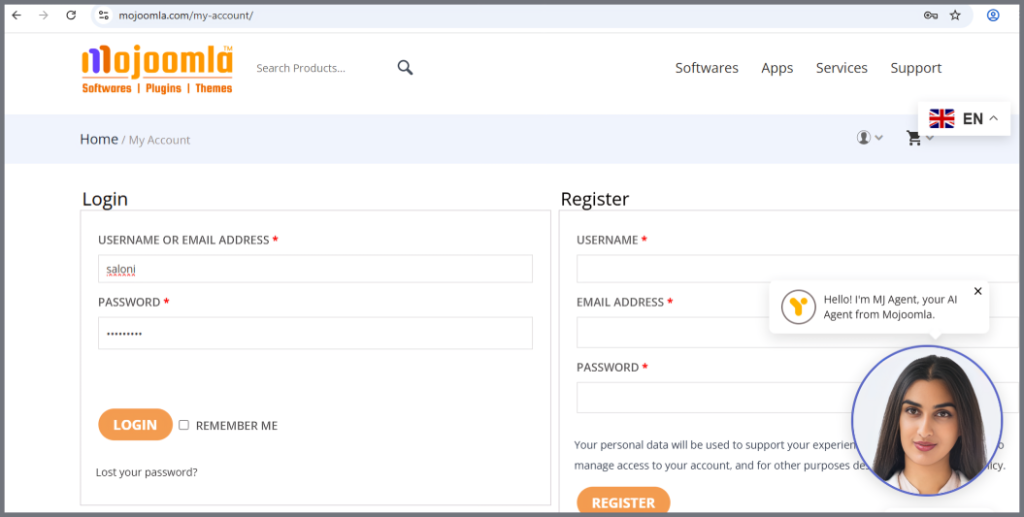
Step 1: Login to Your Mojoomla Account
- Go to the mojoomla.com website.
- Click Login and enter your Username and Password.
- You are now logged into your account
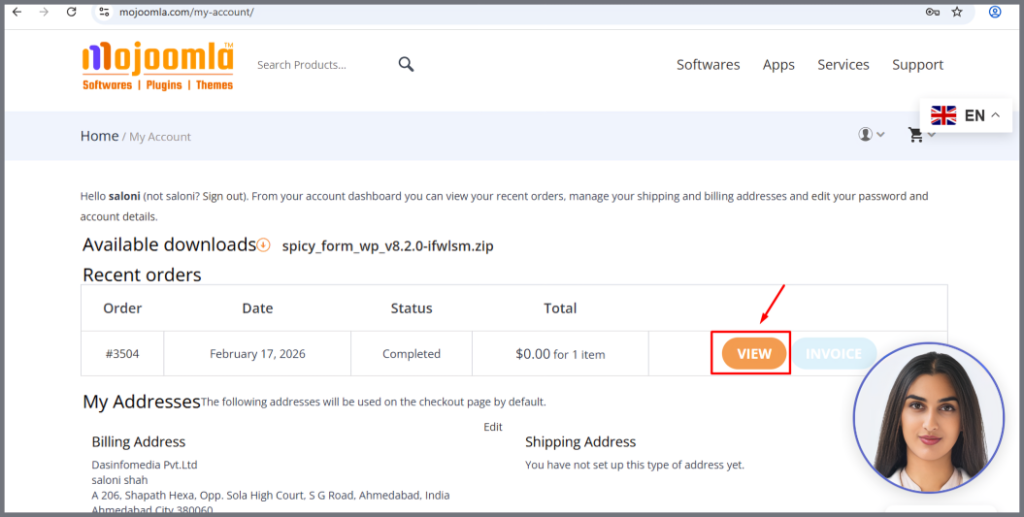
Step 2: Go to My Account from Profile Dropdown
- The Recent Orders section shows your orders.
- Click View.
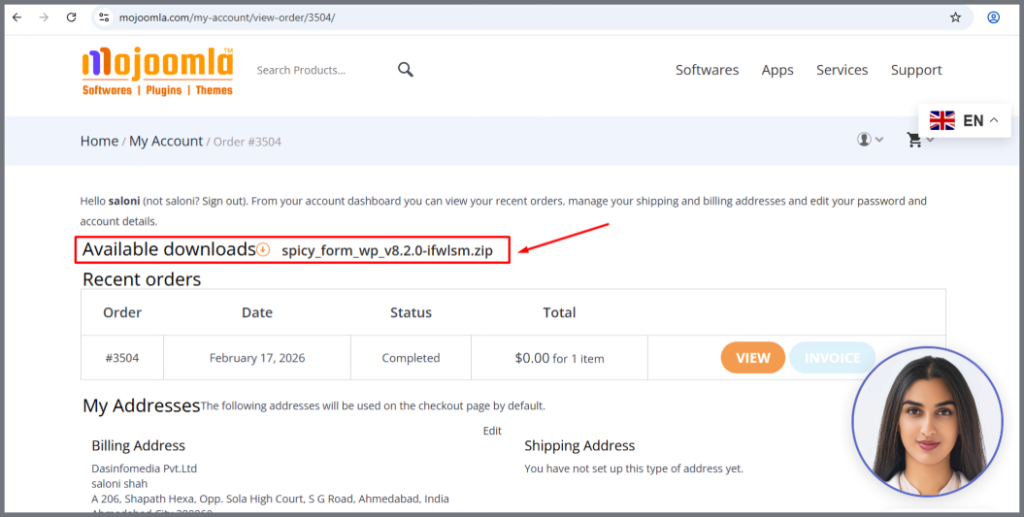
Step 3: Download Product
You can see the “Available Downloads” button – Download the ZIP file now.
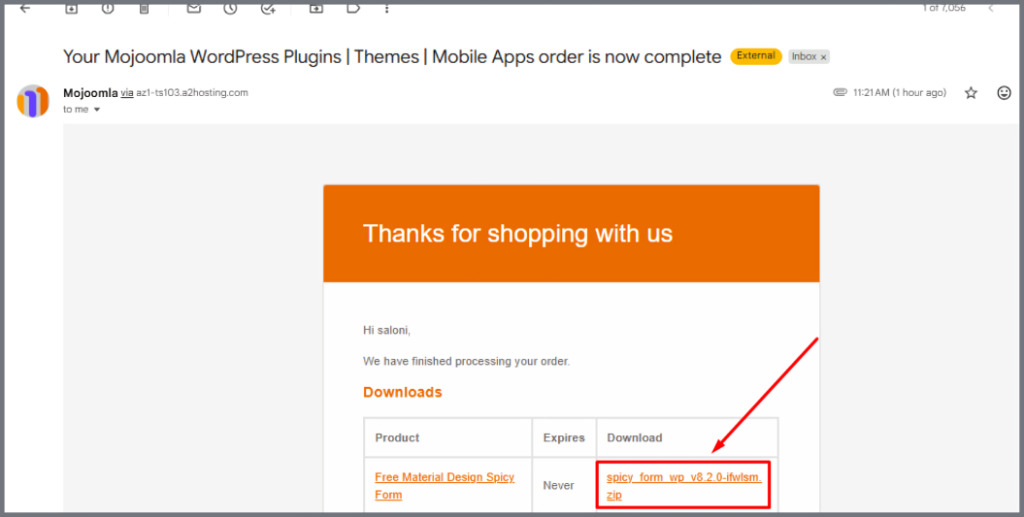
Method 2: Download from Email:
After your purchase, you will receive an email with the subject:
“Your Mojoomla WordPress Plugins | Themes | Mobile Apps order is now complete.”
Inside the email:
- You will see your order details
- A download link will be available
Click the link and download your ZIP file. [ Make sure you are logged In on mojoomla.com website]
Final Step: Unzip and SetUp
After downloading:
- Go to your computer’s download folder
- Right-click the ZIP file
- Click Extract / Unzip
- Follow the setup instructions to install your product
Now your Mojoomla product is ready to use.
January

School Management Software in Texas
All-in-One School Solution for Texas Schools (2026)
Mojoomla provides an all-in-one School Management Software solution for schools in Texas. Built for U.S. education systems, it helps school administrators digitize student records, staff management, attendance, fees, and academic operations reducing administrative workload and bringing full automation to Texas schools.
Why Schools in Texas Are Moving to Digital Management Systems
Texas has one of the largest and most diverse education landscapes in the United States. From private schools and charter schools to academies and independent institutions, school administrators across Texas manage large volumes of students, staff, and academic data every day.
A centralized School Management Software allows Texas schools to simplify operations, improve data accuracy, and focus more on education rather than paperwork.
What Is Mojoomla’s School Management Software?
Mojoomla’s School Management Software is a WordPress-based school administration system designed to help Texas schools digitize and manage daily academic and administrative activities from one secure platform.
Using this system, Texas school administrators can manage:
- Student admissions and profiles
- Teacher and staff information
- Classes, sections, and schedules
- Attendance tracking
- Fee and payment records
- Academic data and reports

Because it is built on WordPress, the software is easy to deploy, maintain, and scale making it suitable for small and medium-sized schools across Texas.
Key Benefits for Schools in Texas
1. Simplified Student Administration
- Texas schools can store all student data in one centralized system.
- Admissions, academic records, and student history are easily accessible, reducing dependency on manual files.
2. Attendance & Academic Management
- Daily attendance tracking and class organization become more efficient.
- This is especially valuable for Texas charter schools and growing private institutions managing multiple grades or programs.
3. Fee Management & Transparency
- Track school fees, payment status, and billing records accurately.
- Administrators gain better financial visibility, helping Texas schools reduce disputes and improve cash flow management.
4. Staff & Teacher Records
- Manage teacher assignments, staff roles, and employment details digitally.
- This reduces repetitive data entry and improves administrative coordination.
5. Reduced Administrative Burden
- Automation helps Texas school administrators save time, reduce errors, and focus more on student outcomes and school development.
6. Academic Data & Reports
- Track student academic performance efficiently, maintain detailed exam and assessment records, generate accurate academic reports instantly, and support data-driven academic decisions.
Why WordPress-Based Software Works Well for Texas Schools
Many Texas schools already use WordPress for their websites or internal portals. Mojoomla’s solution integrates naturally into this environment.
- No need for complex infrastructure
- Easy updates and long-term maintenance
- Customization flexibility
- Familiar interface for administrators
This makes the software practical for Texas schools seeking powerful features without enterprise-level complexity.
Getting Started with School Management Software in Texas
Digitizing school operations does not need to be complex or expensive. Mojoomla’s School Management Software helps Texas schools move from manual systems to a centralized digital platform that improves efficiency, accuracy, and transparency.
Whether you manage a private school, charter school, or academy in Texas, this solution provides the tools needed to run your school smoothly in 2025 and beyond.
👉 Recommended Next Steps:
- Explore the School Solution Package for full automation
- View the School Management System for WordPress plugin for flexible deployment
Frequently Asked Questions (Texas)
January

School Management Software in New York
All-in-One School Solution for New York Schools (2026)
Mojoomla provides an all-in-one School Management Software solution for schools in New York. Built for the U.S. education system, it helps school administrators digitize student records, staff management, attendance, fees, and academic operations reducing administrative complexity and improving efficiency for New York schools.
Why New York Schools Need Modern School Management Software
New York has one of the most dynamic and demanding education environments in the United States. From private schools and charter schools to independent academies and training institutions, school administrators in New York manage complex academic structures, diverse student populations, and strict reporting requirements.
A centralized School Management Software helps New York schools modernize their operations, reduce manual workload, and maintain accurate, real-time data across all departments.
What Is Mojoomla’s School Management Software?
Mojoomla’s School Management Software is a WordPress-based school administration system designed to help New York schools digitize and manage daily academic and administrative operations from a single, secure platform.
Using this system, school administrators in New York can manage:
- Student admissions and profiles
- Teacher and staff information
- Classes, sections, and schedules
- Attendance tracking
- Fee and payment records
- Academic data and reports
Because it is built on WordPress, the system is flexible, scalable, and easy to maintain making it suitable for small to medium-sized schools throughout New York.
Key Benefits for Schools in New York
1. Centralized Student Records
- New York schools can maintain complete student profiles in one location.
- Admissions, academic history, and personal records are easily accessible, improving accuracy and reducing dependency on paper files.
2. Attendance & Class Management
- Daily attendance tracking and class organization become simpler and more reliable.
- This is especially helpful for charter schools and academies managing multiple grades or programs.
3. Fee Management & Financial Clarity
- Track school fees, payment status, and billing records efficiently.
- Administrators gain clear financial visibility, helping New York schools avoid disputes and improve financial planning.
4. Staff & Teacher Administration
- Manage teachers, staff roles, and assignments digitally.
- This reduces repetitive administrative work and improves coordination across departments.
5. Reduced Administrative Complexity
- Automation allows New York school administrators to save time.
- Reduce errors and focus more on academic quality.
- Improve student outcomes with less administrative overhead.
6. Academic Data & Reports
- Track student academic performance efficiently.
- Maintain detailed exam and assessment records.
- Generate accurate academic reports instantly.
- Support data-driven academic decisions.
Why WordPress-Based Software Is Ideal for New York Schools
Many New York schools already use WordPress for their websites or internal portals. Mojoomla’s solution integrates naturally into this environment.
- No complex infrastructure setup
- Easy long-term maintenance and updates
- Flexibility for customization
- Familiar interface for administrators
This makes the system a practical choice for New York schools seeking modern features without enterprise-level complexity.
Getting Started with School Management Software in New York
Digitizing school administration does not need to be complicated or expensive. Mojoomla’s School Management Software helps New York schools move from manual processes to a centralized digital platform that improves efficiency, accuracy, and transparency.
Whether you manage a private school, charter school, or academy in New York, this solution provides the tools needed to run your school smoothly in 2026 and beyond.
👉 Recommended Next Steps:
- Explore the School Solution Package for full automation
- View the School Management System for WordPress plugin for flexible deployment
Frequently Asked Questions (New York)
January

School Management Software in California
All-in-One School Solution for California Schools (2026)
Mojoomla provides an all-in-one school management software solution for schools in California. Built for the U.S. education system, it helps school administrators digitize student records, staff management, attendance, fees, and academic operations, reducing administrative workload and improving efficiency across private and charter schools.
Why California Schools Need Modern School Management Software
Schools in California operate in one of the most complex education environments in the United States. With increasing enrollment, diverse student needs, strict reporting requirements, and growing expectations for digital access, school administrators face constant pressure to manage operations efficiently.
A centralized School Management Software helps California schools move away from manual processes and adopt a modern, automated system designed for today’s educational demands.
What Is Mojoomla’s School Management Software?
Mojoomla’s School Management Software is a WordPress-based school administration system designed to help California schools digitize and manage daily operations from a single platform.
It allows school owners and administrators to manage:
- Student admissions and profiles
- Teacher and staff records
- Class and section organization
- Attendance tracking
- Fee management and payment records
- Academic data and reports
Because the system is built on WordPress, it is flexible, scalable, and easy to maintain making it ideal for small to medium-sized schools across California.
Key Benefits for Schools in California
1. Centralized Student Management
- Securely manage all student data in one place
- Track records from admission to academics
- Access accurate information instantly
- Reduce paperwork with digital records
2. Attendance & Class Management
- Track daily student attendance digitally
- Manage class schedules and sections
- Organize multiple grades and programs
- Improve classroom administration efficiency
3. Fee & Payment Tracking
- Track student fees and payment status
- Maintain clear billing records
- Reduce payment-related confusion
- Improve financial transparency
4. Staff & Teacher Administration
- Manage teachers and staff digitally
- Assign roles and responsibilities easily
- Reduce manual staff record keeping
- Save time with centralized management
5. Reduced Administrative Workload
- Automation allows California school administrators to save time.
- Reduce errors and focus more on academic quality.
- Improve student outcomes with less administrative overhead.
6. Academic Data & Reports
- Track student academic performance efficiently
- Maintain detailed exam and assessment records
- Generate accurate academic reports instantly
- Support data-driven academic decisions
Built for Private, Charter, and Independent Schools in California
Mojoomla’s School Management Software is particularly suitable for:
✅ Private schools in California
✅ Charter schools across urban and suburban areas
✅ Independent academies and training institutions
✅ Small and medium-sized schools transitioning to digital systems
The software is designed to be affordable, easy to use, and quick to deploy, making it accessible even for schools without large IT teams.
Getting Started with School Management Software in California
Digitizing school administration does not need to be complicated. With Mojoomla’s School Management Software, California schools can move from manual processes to a centralized, digital system that improves efficiency, accuracy, and transparency.
Whether you run a private school, charter school, or academy in California, this solution helps you manage daily operations with confidence.
👉 Recommended Next Steps:
- Explore the School Solution Package for full automation
- View the School Management System for WordPress plugin for flexible deployment
Frequently Asked Questions (California)
December

Top 5 Practical Ways AI Can Transform Attendance in Traditional Schools
As the education sector continues to progress, AI-driven Attendance Systems are replacing outdated roll-call methods with smarter, quicker, and more efficient solutions. These innovative systems streamline the process, ensuring accurate attendance tracking while saving valuable classroom time. Here are the top five ways AI is transforming attendance management in schools.
1️⃣ AI Face Recognition at Classroom Entry: Students walk into class → camera recognises faces → attendance is auto-marked.
Why it’s powerful:
✔ Zero manual roll-call
✔ No proxy attendance
✔ Real-time dashboards for teachers & parents
2️⃣ RFID + AI Analytics (Smart ID Cards): Students tap ID cards or are detected automatically via RFID readers.AI verifies the student + time + classroom.
Why schools love it:
✔ Low-cost hardware
✔ Very accurate
✔ Works for entry gate + classrooms + bus
3️⃣ QR Code Attendance (AI-Verified): Teacher displays QR → students scan → AI cross-checks identity to avoid cheating.
Why it’s effective:
✔ No hardware needed
✔ Fast and simple
✔ Perfect for high school & college
4️⃣ AI Voice-Based Roll Call: Teacher says: “Respond ‘Yes’ when I call your name.” AI detects voice, matches it to students, and marks attendance.
Why useful:
✔ Hands-free
✔ Good for primary students
✔ Works without cameras
5️⃣ AI-Powered Bus Boarding Attendance: AI face scan or RFID automatically marks attendance when students board the school bus.
Why parents love it:
✔ “Your child is on the bus” notifications
✔ Morning attendance captured automatically
✔ Improves student safety
Explore MJSchool Today
AI Attendance Systems make schools smarter, safer, and easier to manage. See how Mojoomla can improve your school’s attendance. Start today!
November

Top 5 Features Every Gym Software Should Have
Running a gym is about more than just offering great workouts. It’s about managing everything smoothly, keeping your members happy, and growing your business. Gym Software can make all of this easier. But how do you know which features you really need?
Here are the Top 5 Features every Gym Software should have:
- Smart Dashboard & Easy Onboarding: A powerful dashboard keeps your entire gym operation at your fingertips. With quick-access tools and intuitive onboarding, you can manage new member registrations and get insights instantly.
Key features:
– Fast and simple member registration
– Quick-access reports and performance summaries
– Calendar view for classes, sessions, and events - Membership & Class Management: Say goodbye to paper schedules and phone calls. Good gym software allows your members to book or cancel classes online. It’s convenient for them and keeps your classes organized.
Key features:
– Online class bookings and cancellations
– Customizable membership plans
– Automatic reminders for bookings - Workouts & Nutrition Planning: Help members achieve their goals with personalized workout and nutrition tools. Trainers should be able to assign plans, while members track and log their daily progress.
Key features:
– Trainer-assigned workout and diet plans
– Progress logging for workouts and meals
– Goal tracking with visual insights - Attendance & Progress Tracking: Tracking attendance helps improve engagement, optimize staffing, and enhance member accountability. With digital tools, check-ins and progress monitoring become effortless.
Key features:
– QR code check-ins for members
– Built-in fitness calculators (BMI, calories, etc.)
– Staff attendance and shift tracking - Reports & Payments: Understanding how your gym is doing is crucial. Reports and analytics can help you see how many members you have, how much you’re earning, and which classes are most popular.
Key features:
– Financial reports (revenue, payments, etc.)
– Member retention tracking
– Secure online and offline payment options
In short, Gym Software with these features can save you time, improve your members’ experience, and help your business grow.
Want to simplify your gym’s management? Check out the Gym Management Solution for WordPress here!
November

How to Digitize Your Gym: A Step-by-Step Guide to Building a Strong Online Presence
Having an online presence is important for any business, and gyms are no exception. In fact, 70% of successful gyms have a strong online presence, which helps them grow. Here’s how you can easily get your gym online and improve your business.
- Create a Website with WordPress: Start by building a website. WordPress is an easy-to-use platform with many customizable templates. You can pick a design that fits your gym’s style and add details like class schedules, pricing, and membership options. A website is the foundation of your online presence and helps new members find your gym.
- Set Up Social Media Profiles: Next, create social media accounts for your gym. Facebook, Instagram, and Twitter are great tools for connecting with people. Here’s how to use each one:
Facebook: Share updates, events, and stories from your members. It helps build a community.
Instagram: Post pictures and videos of your gym, classes, and trainers. This keeps your followers excited and engaged.
Twitter: Share quick updates, fitness tips, and engage with your audience
These platforms help you stay connected with members and attract new ones. - Claim Your Google Business Listing: Claiming your Google Business Listing is important for local searches. This helps people find your gym easily on Google and Google Maps. Make sure your gym’s details are accurate and up to date. Encourage members to leave reviews to boost your credibility and attract more clients.
- Use Gym Management Software: Invest in gym management software. This software helps with member management, billing, scheduling, and more. It’s like having a personal assistant to handle your gym’s operations.
- Create a Mobile App for Your Gym: A mobile app for your gym is essential. With a Gym App, members can easily book classes, check schedules, and manage their subscriptions right from their phones. This adds convenience and improves the experience for your members.
- Track Attendance with Software: Use software to manage trainer and member attendance. This makes it easy to track who is coming to your gym and helps you stay organized without paper logs.
- Offer Online Class Booking: Make it easy for members to book classes online. With booking software, they can see class schedules and book their spots right away. This saves time and makes it more convenient for your members.
- Gym Software for Easy Accounting: Gym management software can also help you manage your finances. Many gym management tools come with built-in accounting features, allowing you to track expenses, generate financial reports, and handle member billing all in one place. This keeps your gym’s finances organized and makes it easier to stay on top of payments, invoices, and other financial tasks.
- Use a CRM System: A CRM (Customer Relationship Management) system helps you manage your relationships with members. It helps you track interactions, follow up on leads, and keep members happy, which can lead to more referrals.
- Set Up Automatic Payments: Set up automatic monthly subscriptions with online payments. This ensures a steady cash flow and reduces administrative work. Members also appreciate the convenience of automatic payments.
Why Go Digital?
Digitizing your gym isn’t just about keeping up with trends. It’s about making life easier for both you and your members. By using the right tools, you can improve member satisfaction, streamline operations, and increase revenue.
Start implementing these simple tools today and watch your gym grow!
Start today and watch your gym thrive online!
October

How to Reset Your Domain URL for a Garage Master License
If you’ve purchased a license and need to reset it and change the domain URL (e.g., from https://staging.mojoomla.com to https://mojoomla.com), follow these steps to reset your license:
Note: This applies to Garage Master Version v.4.6.1 for the Garage License reset.
How to Reset Your Domain URL for a Purchased License
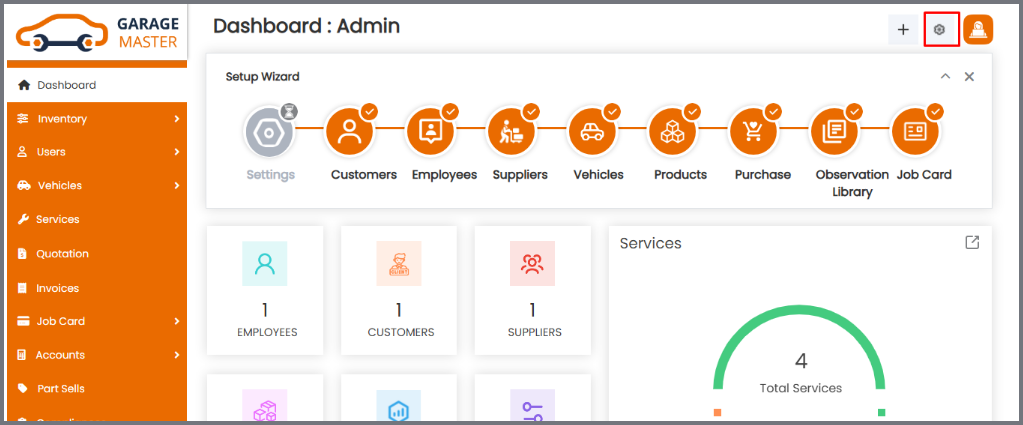
1. Go to the Settings icon at the top-right side: Open https://staging.mojoomla.com and navigate to the License Settings page, where your license details are stored.
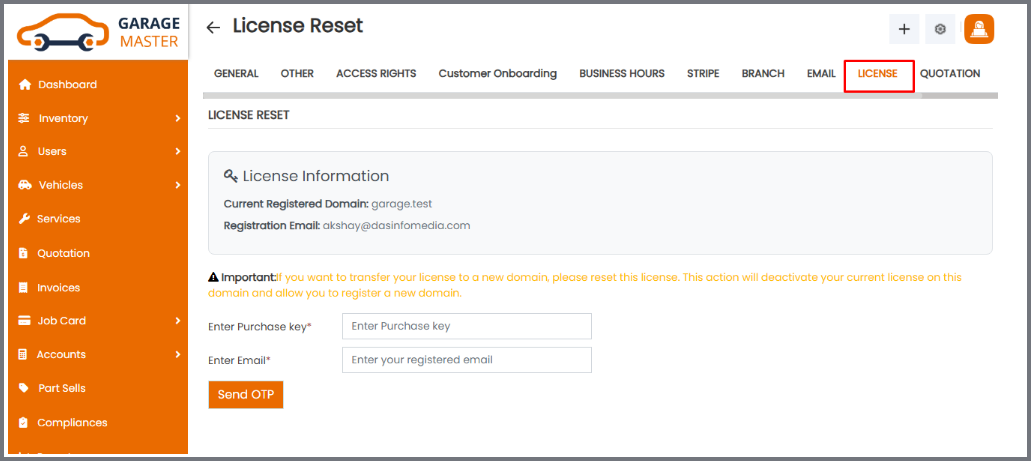
2. Navigate to Reset License: Click on the License tab. You’ll see two fields: Purchased License Key and Email Address.
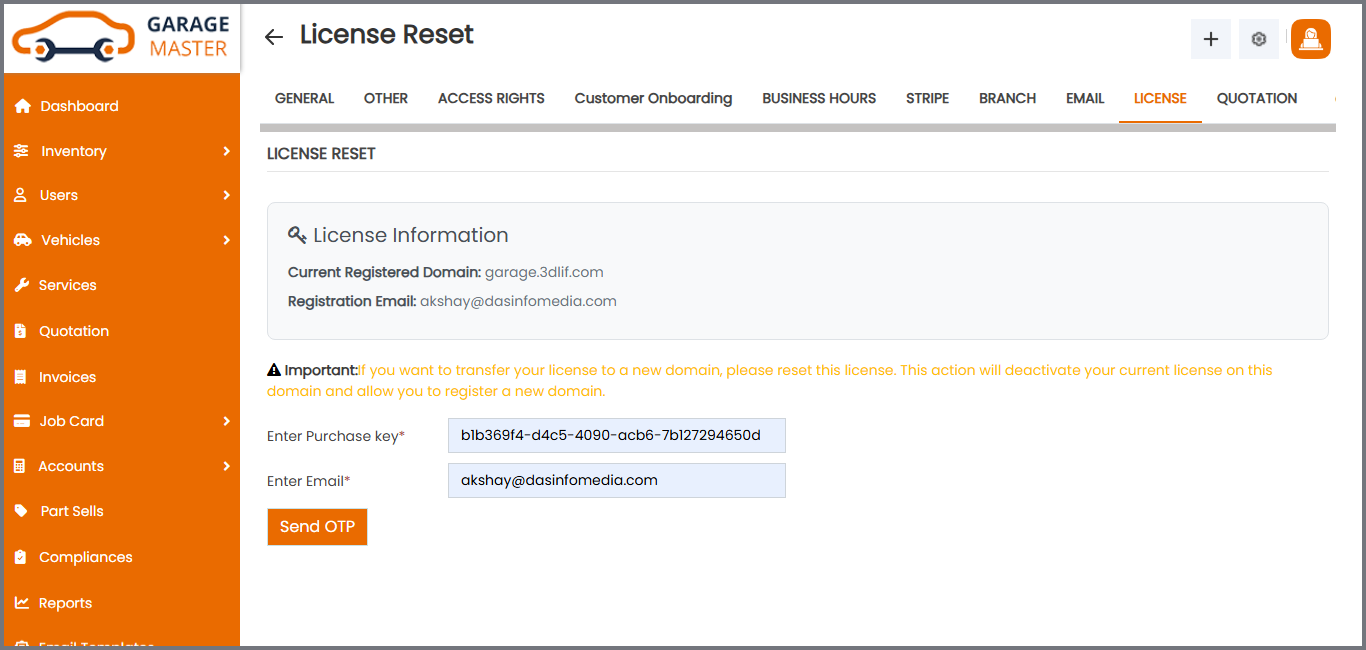
3. Enter Email and Purchase Key: Enter your Purchased License Key and Email Address into the respective fields on the Reset License tab and click on “Send OTP”. Make sure both entries match the credentials originally used during license registration.
4. Enter OTP: Check your email for the One-Time Password (OTP). Enter it into the provided field for verification.
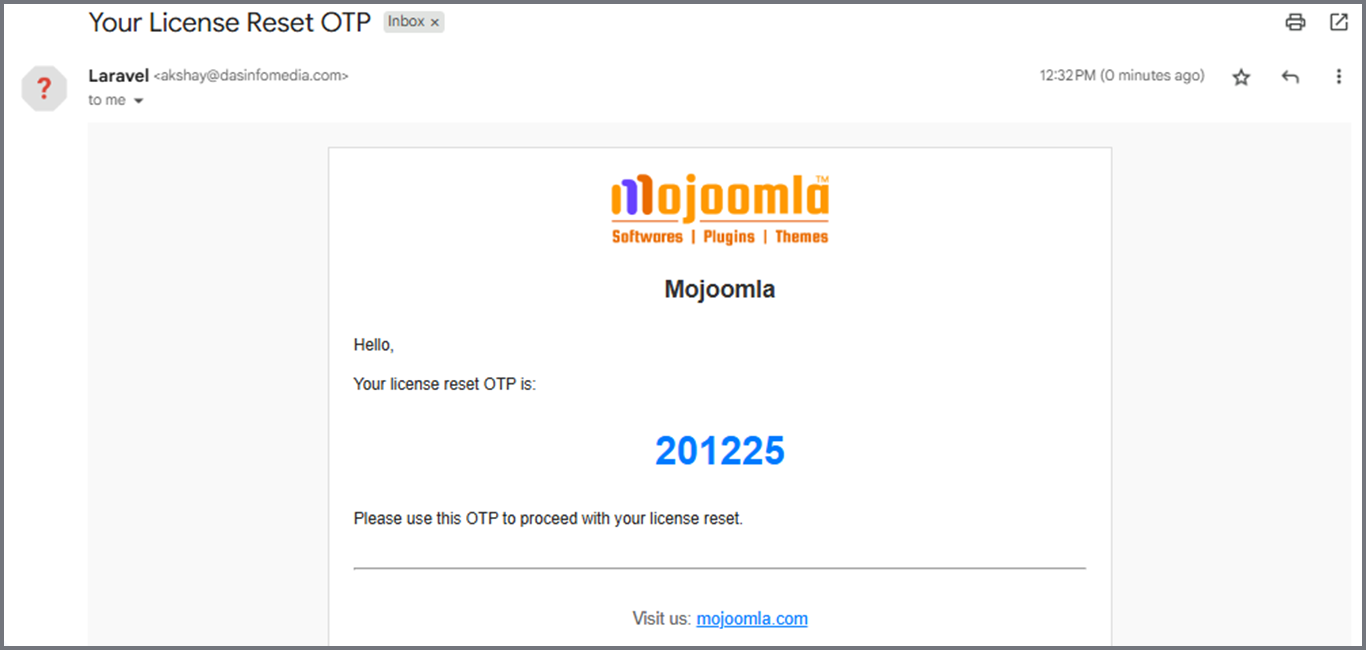
5. Verify OTP: After entering the OTP, confirm to continue.
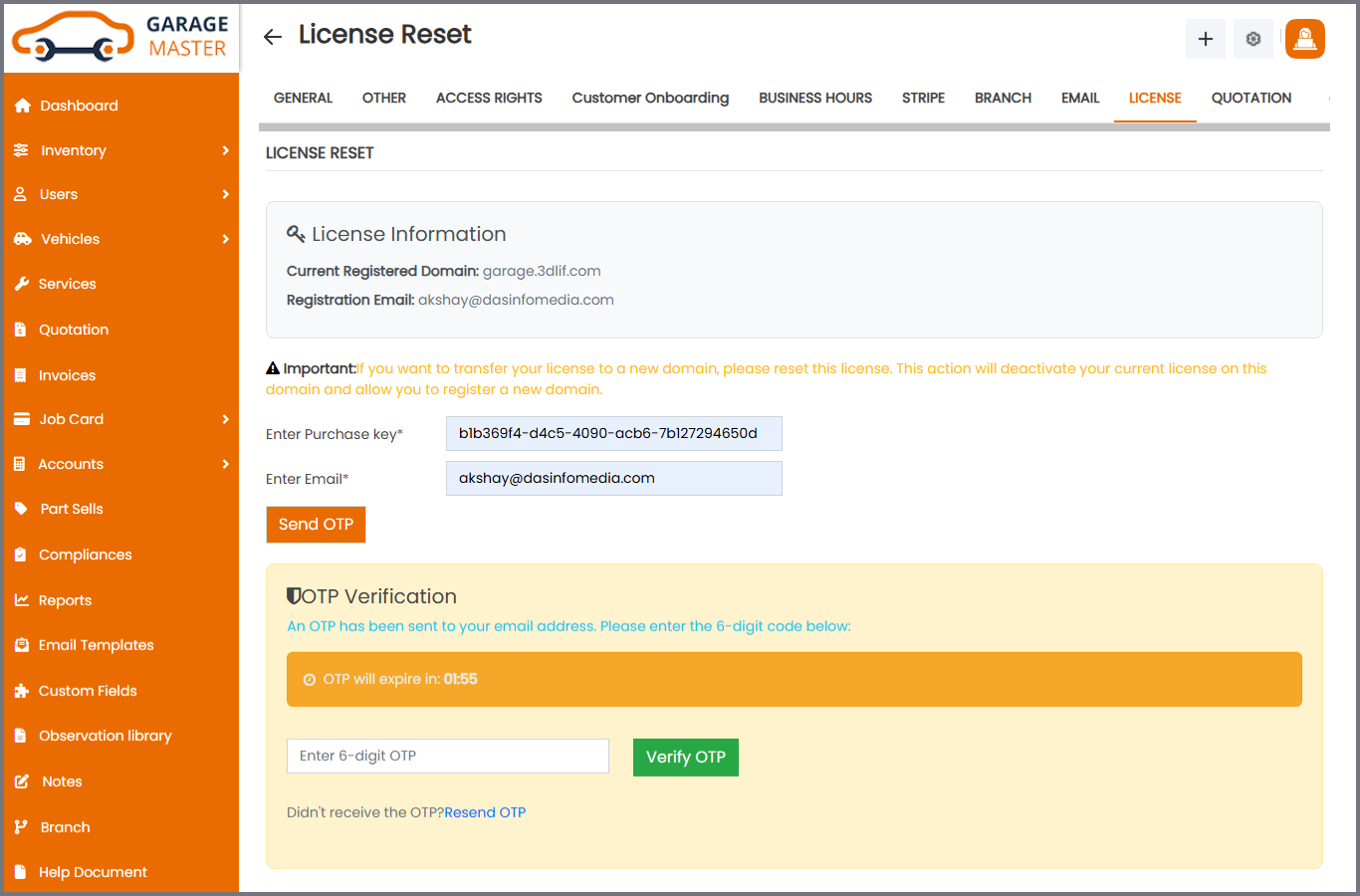
6. License Reset Confirmation: After successful OTP verification, the license for https://staging.mojoomla.com will be reset.
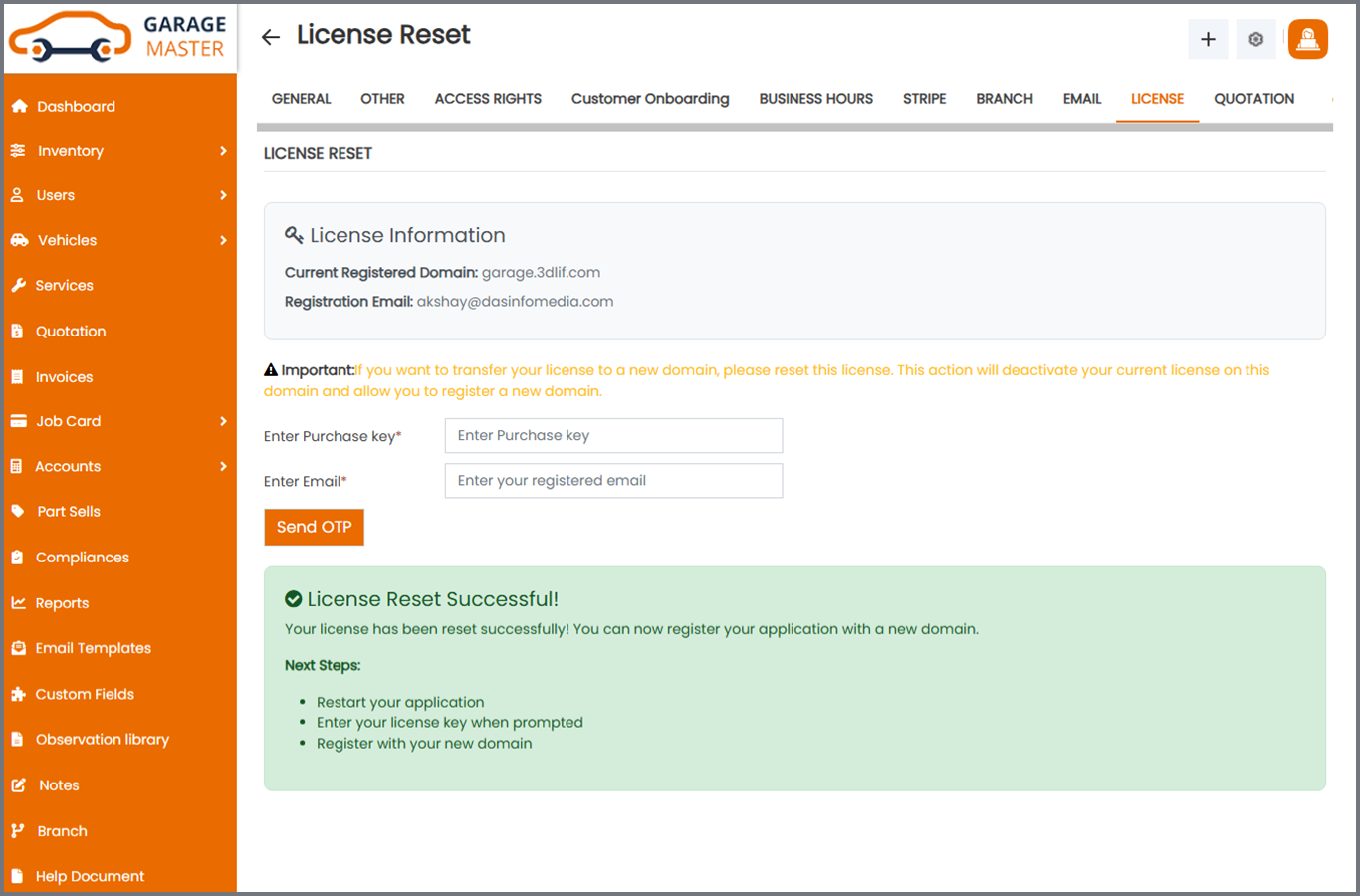
7. After your license is successfully Reset on your staging domain, you have two options to move your site to your production or new domain:
1. If you want to move with your staging database:
– Move all files to the new domain directory.
– Import your staging database into the new domain database (using the same database name, username, and password).
– Once done, log in – you will see the license registration screen again. Register your new domain using the same license key.
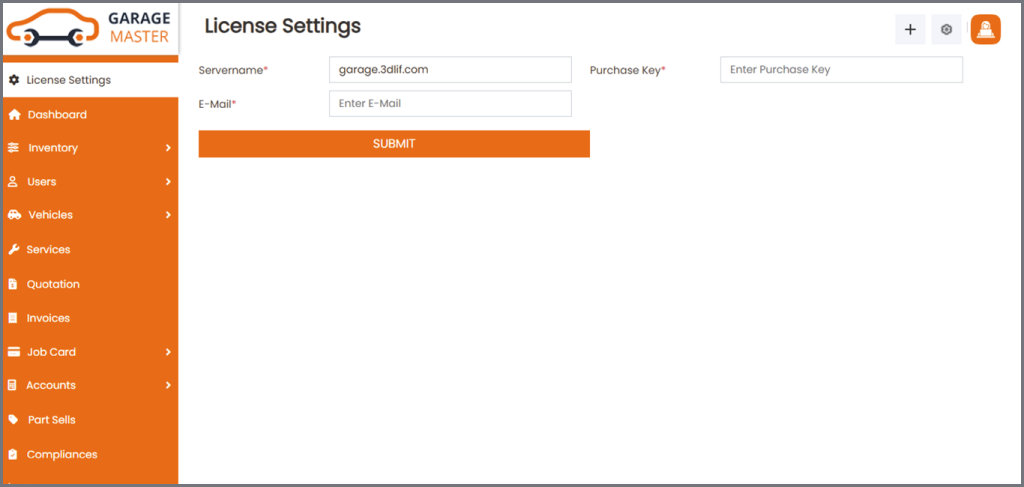
2. If you want to perform a fresh installation on the production or new domain:
– Inside the package Garage_Package_V4.6.5_27_10_2025, you will find a file named garage.zip. (Note: The package name changes with each version update. This is just an example.)
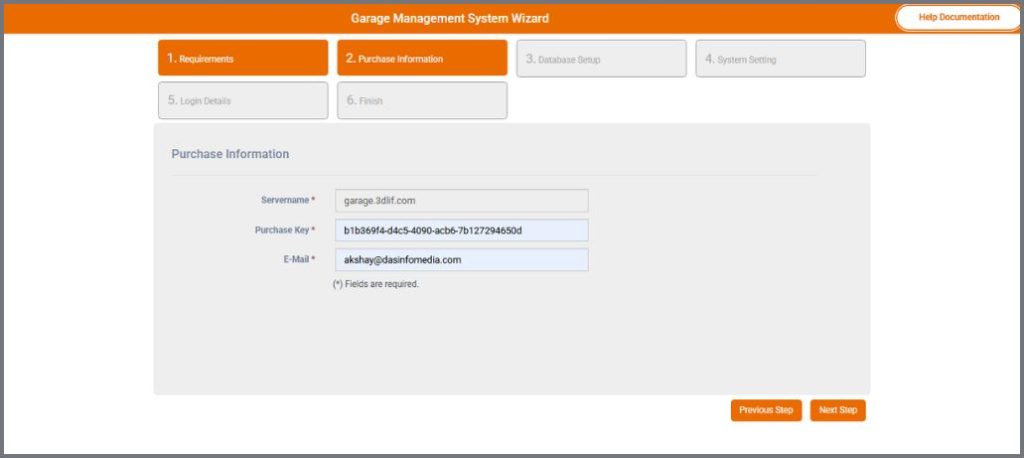
– Follow the same steps you used for your staging domain. Add your purchase information – server name, Purchase Key, and email – during setup.
💡 If you need help, contact sales@mojoomla.com
September

How to Reset Your Domain URL for a Purchased License
If you’ve purchased a license and need to reset it and change the domain URL (e.g., from https://staging.mojoomla.com to https://mojoomla.com) follow these steps to reset your license:
How to Reset Your Domain URL for a Purchased License
1. Go to License Settings: Open https://staging.mojoomla.com and navigate to the License Settings page where your license details are stored.

2. Navigate to Reset License: Select the Reset License tab. You’ll see two fields: Registered License Key and Registered Email.

3. Enter Email and License Key: Enter your Registered License Key and Registered Email Address into the Respective fields on the Reset License tab. Make sure both entries match the credentials originally used during license registration.

4. Enter OTP: Check your email for the One-Time Password (OTP). Enter it into the provided field for verification.

5. Verify OTP: After entering the OTP, confirm to continue.

6. License Reset Confirmation: After successful OTP verification, the license for https://staging.mojoomla.com will be reset.

7. Register New Domain: Once the reset is complete, you can re-register the same license key with your new domain: https://mojoomla.com
💡 If you need help, contact sales@mojoomla.com